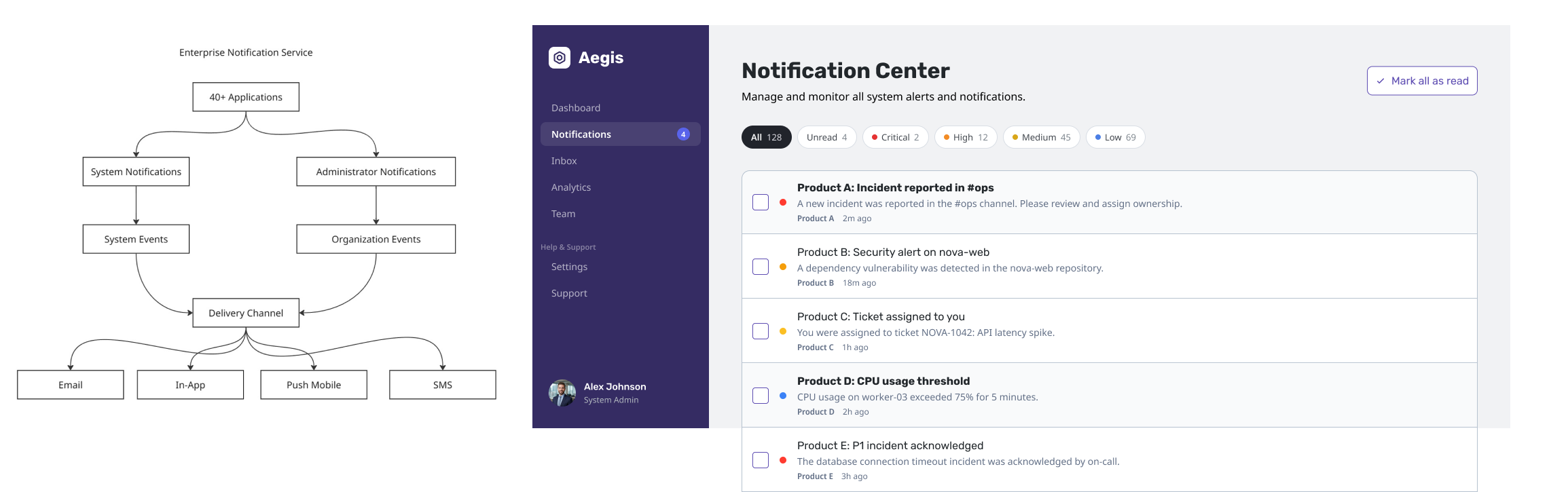
Overview
Redesigning an enterprise notification architecture to reduce administrative complexity, improve scalability, and support a growing product ecosystem.
Aegis is a redesign of an enterprise notification service used across a growing ecosystem of products.
As the platform expanded, every notification had to be configured manually by administrators, including critical system events. What began as a flexible solution became difficult to scale, increasing onboarding effort, support complexity, and creating gaps against competing enterprise platforms.
Rather than redesigning individual notification screens, I redefined how notifications were owned, configured, and delivered across the product ecosystem.
My Role
Lead Product Designer
- 🏗 Re-architected the notification service across a 40+ product ecosystem.
- 🧩 Defined the interaction model for System and Administrator notifications
- 👥 Defined ownership boundaries between the platform, administrators, and end users.
- 🤝 Facilitated workshops with Product, Engineering, Customer Support, and Solution Consultants to map notification ownership across the ecosystem
- 📚 Established reusable patterns and documentation for future development and iterations
Business Context
Existing Notification Architecture
Before this project, the platform treated every notification as an Administrator-managed notification. Whether it was a password reset, compliance reminder, or organization announcement, administrators were responsible for configuring it before users could receive it.
Below is the MVP flow that Administrator has to go through for each notification:
Administrator creates notification for both system and organization event
      v
Configure recipients
      v
Configure schedule
      v
Send notification
The platform handled only a handful of hard-coded system events, such as password resets and authentication emails. Everything else relied on administrator-created notifications.
As the platform expanded into an ecosystem of 40+ applications, this model became increasingly difficult to maintain.
Every application introduced its own notification templates and configuration requirements. Administrators were responsible for setting up every notification individually, even for common system events that should behave consistently across the platform.
For a customer deploying multiple applications, onboarding meant configuring thousands of notifications one by one before the system was fully operational.
This existing architecture framework created several operational problems:
- Critical system notifications required manual administrator setup before they could function.
- Every customer configured notifications differently, making support issues difficult to reproduce and troubleshoot.
- Enterprise onboarding became slower as organizations adopted more products.
- Product teams repeatedly implemented notification logic instead of sharing a common platform service.
- Missing notification capabilities created risk during competitive enterprise RFPs.
Discovery
To understand the existing architecture, I facilitated workshops with:
- Product Managers
- Engineering
- Customer Support
- Solution Consultants
Together we mapped:
- notification ownership
- notification lifecycle
- product dependencies
- configuration pain points
- enterprise onboarding flow
Mapping the notification lifecycle across products revealed that the real problem wasn’t notification delivery. It was ownership. Every team had built notifications independently, but no one owned communication as a platform capability.
Enterprise products communicate constantly.
-
Password resets.
-
Compliance reminders.
-
Training assignments.
-
Workflow failures.
-
System maintenance.
-
Administrator announcements.
Without a shared communication model, users receive too many notifications, administrators lose control, and important information becomes difficult to distinguish from routine updates.
How might we design a communication architecture that balances platform automation with organizational flexibility?
The challenge wasn’t designing individual notification components.
It was designing the rules, relationships, and workflows that govern how communication happens across an enterprise product ecosystem.
Multiple user personas
There are at least 3 main user personas:
| Layer | Owner | Responsibility | Examples |
|---|---|---|---|
| 0 | Platform | System-generated notifications | Password reset, authentication, compliance |
| 1 | Administrator | Organization notifications | Announcements, scheduled reminders, campaigns |
| 2 | End User | Receives both | Unified notification experience |
End users have the most variant as it is possible for there to be 1 end user with permission to only 1 application or View only access. That would create variants to what notifications they get too.
Design Insight
The Turning Point
The project changed direction once we stopped asking:
“How do we improve notifications?”
and started asking:
“Who owns communication?”
That single question revealed that we weren’t designing one notification system.
We were designing two fundamentally different communication models.
Through research and collaboration with Product and Engineering, I found that enterprise notifications generally fall into two categories.
The platform didn’t have a notification problem. It had an ownership problem.
By treating every notification as administrator-managed, the platform coupled critical system communication with customer configuration. As the ecosystem grew, that decision increased onboarding effort, fragmented the user experience, and made the platform harder to support and extend.
The strategy therefore wasn’t to redesign notifications.
It was to redesign ownership.
System Notifications
Generated automatically by ecosystem events, seen and consumed by every user persona.
Examples include:
- Password resets
- Authentication alerts
- Compliance reminders
- Training assignments
- Workflow failures
These notifications are owned by the product and ensure critical information always reaches the appropriate users.
Administrator Notifications
Created and managed by Administrators, one user persona, for other user persona within the ecosystem.
Administrators configure:
- Notification Channels
- Announcement
- Time-Sensitive Event Schedule
- Time and/or Event-based Recurrence
- Communication Templates
- Notification Preferences
These allow organizations to communicate information specific to their own operational needs while maintaining consistency across the ecosystem.
Design Decisions
Communicate with purpose
Every notification should help users understand what happened, why it matters, and what action to take next.
Give administrators control
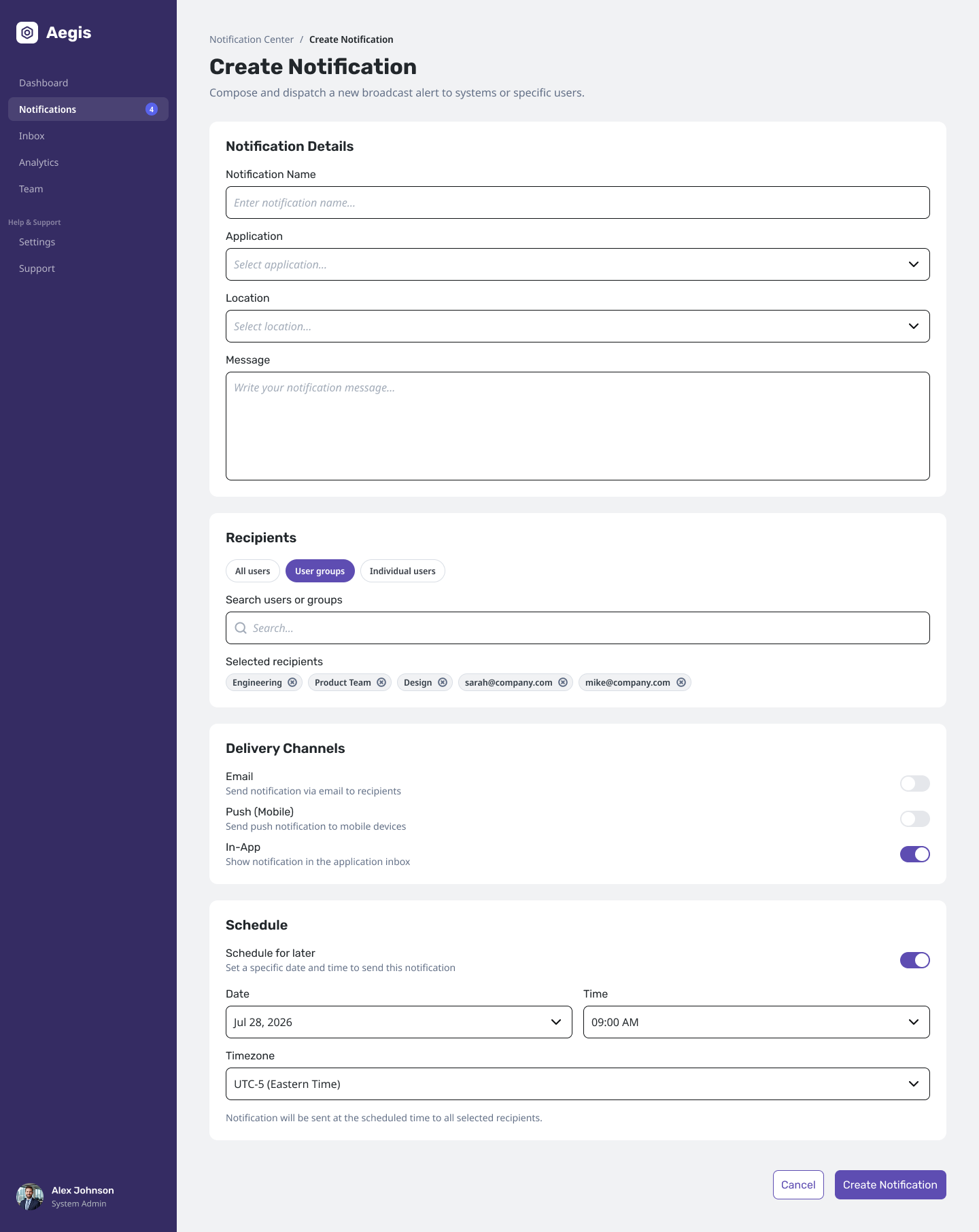
Organizations need flexibility to manage communication without compromising consistency or overwhelming users. Every notification first receives a priority level based on business impact. The platform then determines the appropriate presentation pattern. This prevents product teams from using disruptive UI patterns for low-value information and creates a consistent communication experience across all 40+ applications.
| Component | Priority Level | When to use |
|---|---|---|
| Modal | Time-Sensitive | Critical events that require immediate action |
| Alert Banner | Immediate | High-priority information that should remain visibly persistent |
| Toast | High | Immediate confirmation or short-lived status updates |
| Notification Center Drawer | Medium | Persistent messages and activity history |
| Badge | Low | Passive awareness of unread notifications |
Respect user attention
Not every event deserves an interruption. Critical events surface immediately, while lower-priority communication remains accessible through the Notification Center. Every notification is retained as an auditable record, balancing user attention with enterprise compliance requirements.
Design for scale
Communication patterns should work consistently across multiple products, teams, and user roles within multiple platforms in the ecosystem.
Solution
The redesign transformed notifications from an application feature into a shared platform capability.
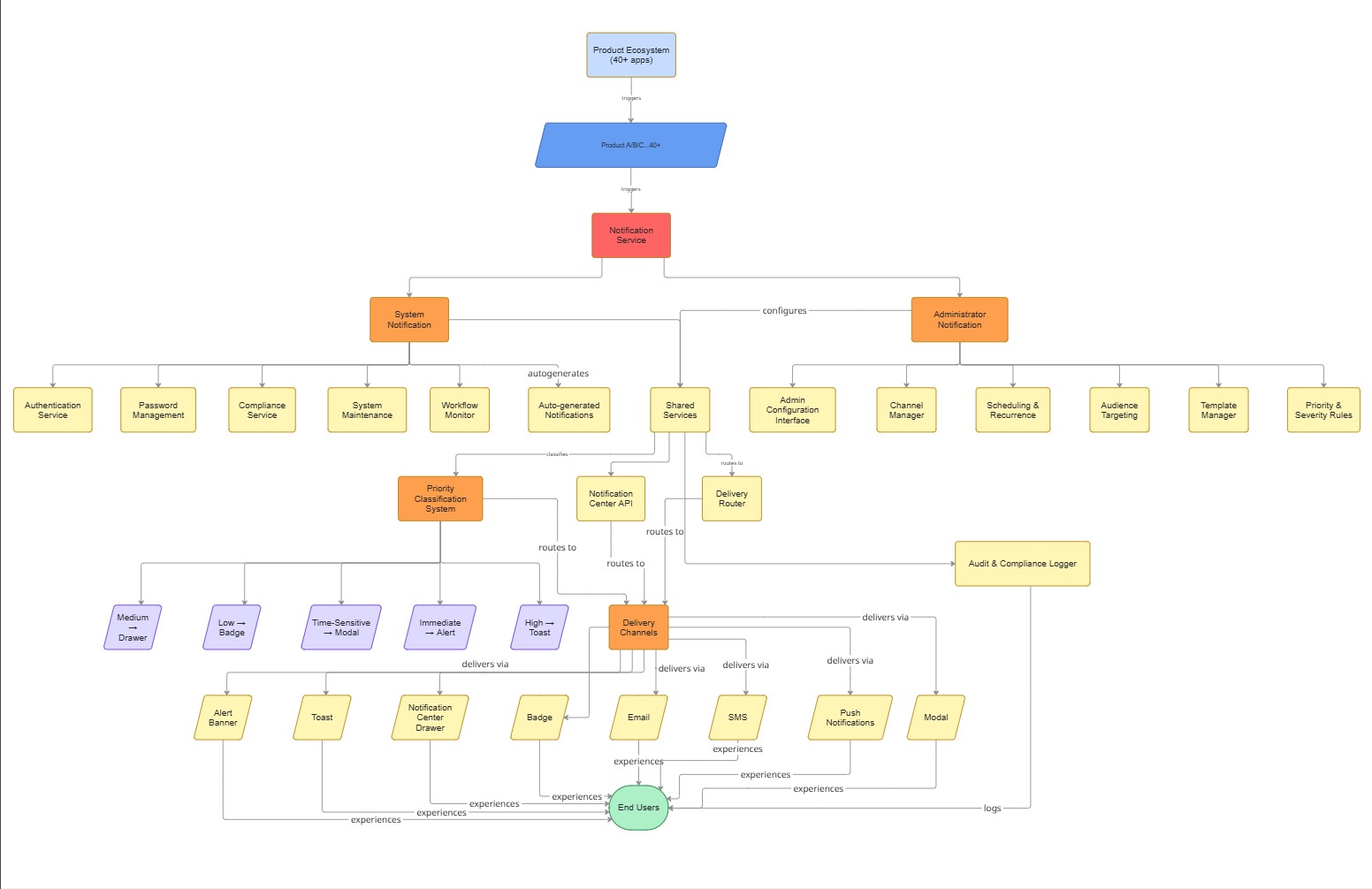
Architecture Decisions
The new notification service established clear ownership boundaries between platform-managed and organization-managed communication.
Platform-owned
Managed centrally by the platform to ensure every user received consistent system communication.
Examples included:
- Authentication
- Password management
- Compliance reminders
- System maintenance
- Workflow failures
These notifications required no manual configuration and became reusable services that future products could consume.
Organization-owned
Managed by Administrators to support each organization’s operational needs.
Administrators could configure:
- Delivery channels
- Scheduling and recurrence
- Audience targeting
- Severity and priority
- Organization-specific announcements
This separation allowed products to share a common communication architecture while remaining flexible enough for different industries and compliance requirements.
Redefining Notification Ownership
| Notifications | Before | After |
|---|---|---|
| Password Reset | Administrator | Platform |
| Authentication | Administrator | Platform |
| Compliance Reminder | Administrator | Platform |
| Organization Announcement | Administrator | Administrator |
After the ownership has been defined, then designing each product and feature would be straightforward as they all have a clearer picture of who is the user and what is their priority.
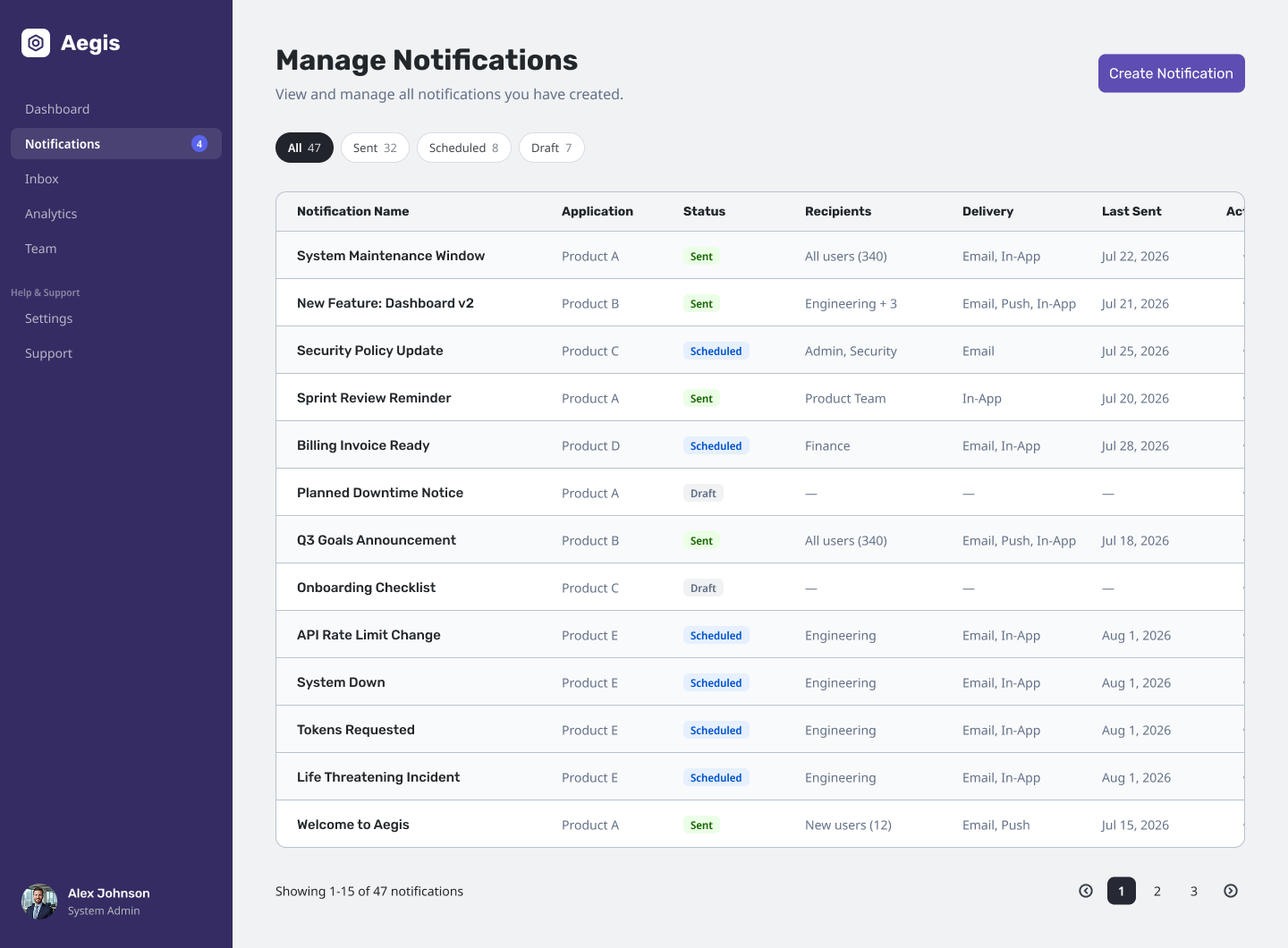
Outcomes
-
Protected a $500K+ ARR client RFP — Redesigned the notification architecture after a major enterprise customer identified email-only notifications as a critical product gap during renewal discussions.
-
Closed a competitive feature gap — Introduced configurable notification channels and administrator-managed notifications, bringing the platform closer to enterprise expectations and competitor capabilities.
-
Established a scalable communication framework — Defined reusable patterns for system-generated and administrator-managed notifications, enabling consistent implementation across the product ecosystem.
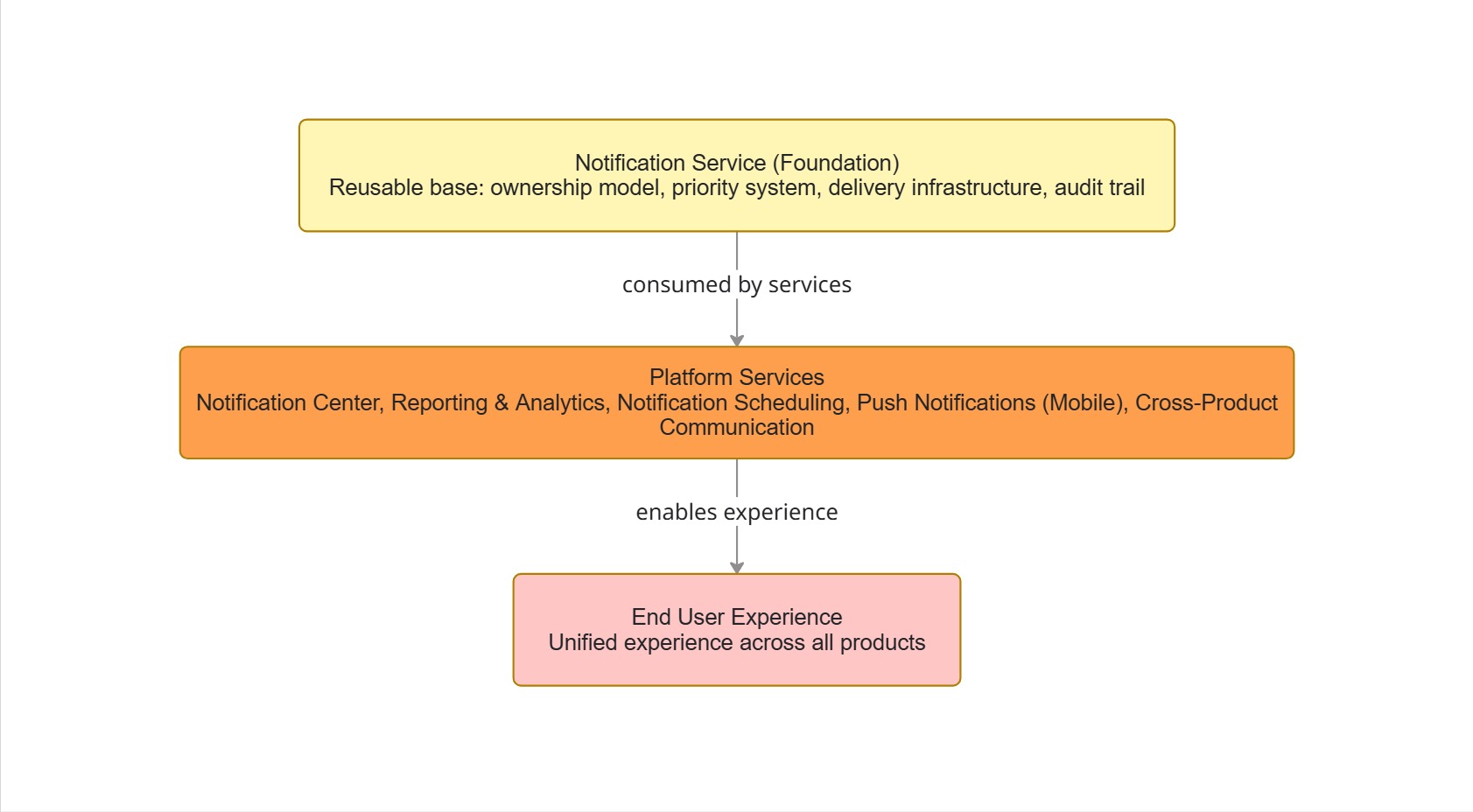
Foundation for Future Services
The new architecture became the foundation for future platform capabilities and products, including:
- Notification Center
- Reporting
- Notification Scheduling
- Push Notifications for Mobile App
- Cross-product communication
Good enterprise communication isn’t about sending more notifications. It’s about helping people receive the right information at the right time, through the right channel.